

Casushi Casino Login, Registration and Verification Processes
Once you’ve acquired your Casushi login credentials, you will be able to access dashboard functions, your user profile, and more importantly, start playing for real cash.
As a licensed online casino, Casushi is fully compliant with British anti-money laundering, age verification and minor protection laws, so the verification is mandatory.
In this guide you’ll learn how to register a new profile, which documents are required for KYC checks and what to do in case you’ve forgotten your password.
Benefits of Having a Personal Account with Casushi Login
Having your personal Casushi Casino login credentials will give access to all the benefits this online casino has to offer. This includes seamless access to well over 3,000 games, an SSL and HTML5-protected connection to the platform, heaps of exclusive offers and much more. Below, I’ll list just some of the many advantages you can expect after signing up at Casushi UK:
- Thousands of popular UK online slots from major brands like Pragmatic and Evolution
- Instant mobile connectivity through an optimized website
- Personalised gaming experience with bespoke promos and customer care
- A bundle of 100 free spins when you bet your first £10
- Daily no-deposit bonus
- Higher limits for deposits and payouts
- Faster support and personalised assistance
- Tournaments, drops and seasonal events
How to Register for an Account
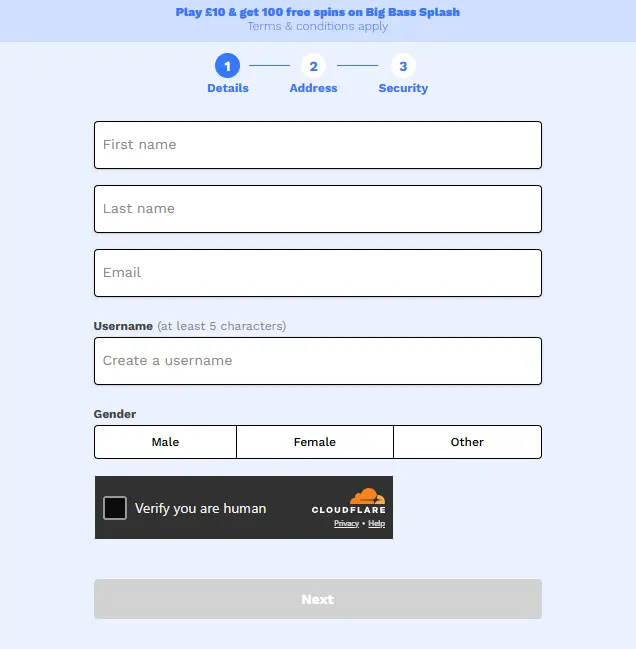
Completing the Casushi sign up process is designed to be a quick process. I’ll list all the steps you need to follow to get your profile up and ready to play:
- Select Join Now in the top right.
- Enter your full name and your email address.
- Choose a username of at least 5 characters and pick your gender.
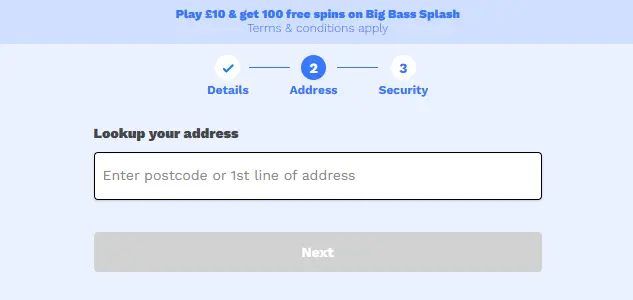
- Tap on the address field and use Fetchify to identify your location, then tap Next.
- Enter your date of birth.
- Choose your password.
- Read the Terms and Conditions, Cookie and Privacy Policies, and add opt-in marks to all.
- Choose your communication preferences (email or SMS).
- Optionally, tap Yes under Deposit Limit and configure your spending caps.
- Select Create Account to complete your registration.
A piece of advice: make sure to read the verification part of this guide before beginning your Casushi registration to ensure you have the proper paperwork.
Additionally, if you don’t receive the SMS verification automatically, use the Send Code button again once the cooldown timer wears off. Similarly, check your inbox for the verification email and contact the support team in case you’ve never received the activation link.
Required Documents for UK Players
The information needed to complete your Casushi UK login verification includes:
- Photo ID
- Proof of address
- Photocopy of your bank cards (only the first 6 and the last 4 digits)
- Your selfie holding the documents in question
Consult Clause 5 of the site’s T&Cs or contact customer service agents if you need more help regarding this matter.
Verifying Your Credentials
Now that you’re familiar with the required Casushi online casino login paperwork, let’s get you up to speed about how the identity check works:
- Submit the required ID (e.g., your driver’s licence or a passport).
- Upload proof of address (bank statement or a recent utility bill).
- Accept any electronic KYC pop-up windows when prompted.
- Wait for the casino review. The processing time usually takes up to 72 hours.
- Once your documents are approved, your account verification is complete.
You can submit your documents in a number of ways, including email, through Casushi’s website portal or directly to the live chat support agents.
Sign In to Your Account
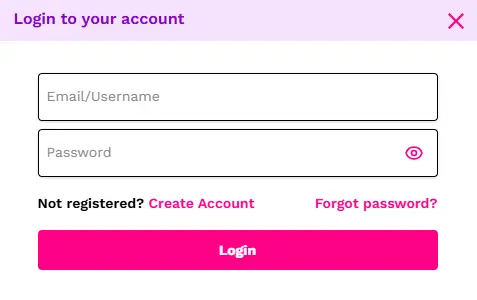
To perform a clean Casushi Casino UK login, all you need to do is click Log In and enter your credentials. Below is a simple guide that will walk you through the necessary steps:
- Select Log In from the top right.
- Type your email or selected username.
- Input your password (tap the Eye icon to make characters visible).
- Tap Login to confirm and complete your Casushi sign in.
My tip: Turn on the 2-factor authentication for better account protection.
Login via Mobile App
You can use your Casushi Casino sign in credentials to access your profile on any newer desktop computer, tablet or smartphone. The mobile login procedure itself is always the same:
- Visit the Casushi website using your mobile browser.
- Tap the Log In button.
- Enter your email address and password, then tap Login.
The mobile version runs directly in your browser, so there’s no need to download an app. It uses HTML5 technology and automatically adapts to your screen size.
Personal Data Protection and Security
The platform safeguards your Casushi UK sign in data at all times. An encrypted connection isn’t the only security measure implemented. Here is what’s available:
- Identity and age confirmation
- Anti-money laundering checks
- Anti-fraud and risk monitoring
- GDPR compliance
- Secure account login
- PCI DSS compliant payment processing
- 256-bit SSL encryption
- Responsible gambling and self-exclusion tools
Troubleshoot Login Issues
The list of issues you may encounter while creating or using your Casushi online casino sign in credentials is fairly short, but I’d still like to run over a few common items and suggest quick troubleshooting fixes so that you can start or resume gaming as quickly as possible:
- Email in use: This is commonly caused by typos, so retype (or copy) your full email address and give it another go. If the problem persists, contact the customer support team.
- Access Denied/Country Blocked: Casushi is exclusively available in the UK. Remember to disable your VPN or proxy apps to return to your British IP and make another login attempt.
- Incorrect Password: Tap the Eye icon to reveal your password’s characters and double-check for typos.
Recovering Forgotten Password or Email
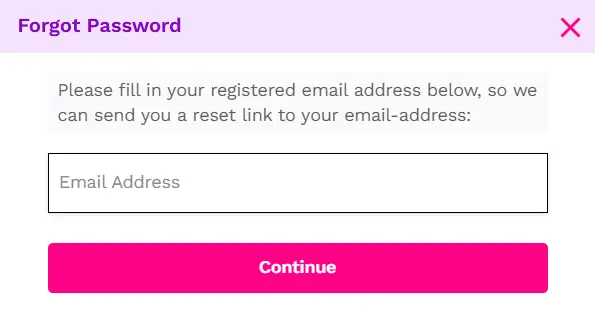
In case you can’t remember your Casushi Casino UK sign in password, tap the Login button and select the Forgot Password button. The next pop-up window will ask for your email address, and if it’s found in the casino’s database, a password reset letter will be sent to your email. If you have any additional security questions, don’t hesitate to contact the casino’s customer care staff via live chat.
How to Delete Your Casushi Online Casino Login Account
Before explaining how to permanently delete your Casushi Casino login data and account, I should advise you that it offers a wide range of responsible gambling tools, including take-a-break from 24 hours to 7 days, deposit limits and additional options that can be configured from the Play Safe menu. If you still wish to continue, follow these steps:
- Log in to your Casushi profile.
- Withdraw balance that you have.
- Contact the customer support.
- Insist on account termination.
- Wait for confirmation that your account has been closed.